

Electronic Team uses cookies to personalize your experience on our website. By continuing to use this site, you agree to our cookie policy. Click here to learn more.

USB over VPN Passthrough: Secure Remote Access to USB Devices

Editorial Team Editorial Team Feb 18, 2026
VPN

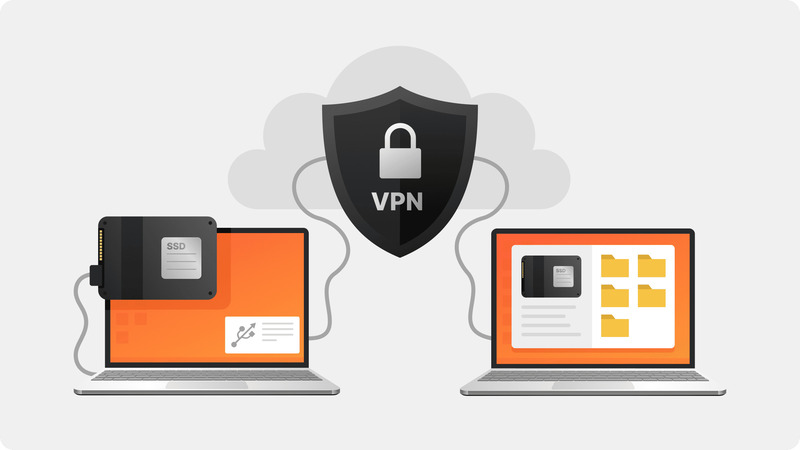
USB passthrough over a VPN is commonly needed by remote workers. Most VPNs don’t include USB passthrough as a feature. Moreover, even when VPNs are used for remote access, such as RDP, the remote access tool may not support certain USB devices. To make sure that all the necessary devices can be accessed over VPN, we recommend using a specialized USB over VPN solution.

When USB Passthrough Over VPN Is Needed

The USB devices that can cause the most issues when connecting over a VPN include printers, scanners, security dongles, biometric scanners, and specialized input devices - in other words, hardware that remote access solutions struggle with. While some USB devices, such as printers, are network-enabled and can, in theory, be routed through a VPN, the setup is certainly not worth the trouble.

Some of the most common VPN solutions - OpenVPN, WireGuard, and Tailscale - do not offer USB passthrough features, and it’s unlikely to change. If attempting USB redirection over a pure VPN, without any remote access software (Citrix, RDP, etc.), then you definitely need a solution like USB Network Gate or VirtualHere.

Software for USB Over IP Passthrough

The following 2 apps are often used to enable USB passthrough over VPN. They have cross-platform compatibility and, at a minimum, good enough latency to support input and output devices.

1. USB Network Gate

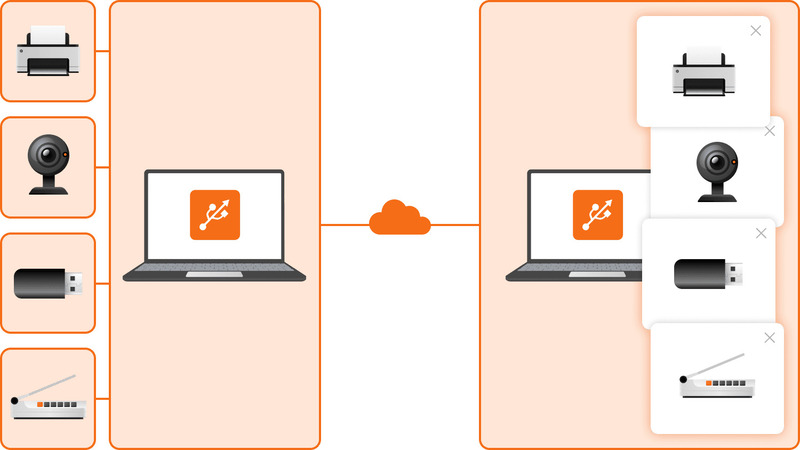
USB Network Gate is a widely-used USB passthrough solution. A USB Network Gate setup typically consists of a device host - the computer that has USB devices attached to it - and the client, which can remotely access the USB devices connected to the host. The computer behind the VPN can be either a client or a host, and you can both share your devices and access remote ones at the same time.

Connect

USB Network Gate is designed to work with a larger variety of USB devices than remote access solutions can typically handle. For example, 3D mice and biometrics work perfectly with it. The app can also handle video and audio devices, such as webcams or office peripherals, including printers and scanners.

USB Network Gate also provides a wide range of connection and security settings, and allows empty ports to be shared for device hot-swapping.

Here is some benefits:

✅ Low latency
✅ Encryption support
✅ Works with rarely-supported devices
✅ Extensive connection settings
✅ Available for Windows, Linux, macOS, Android, and ARM platforms

2. VirtualHere

VirtualHere is a USB passthrough solution that can be applied to situations where the server and the client need to connect through a VPN. It works with common peripherals, such as USB headsets, printers, gamepads, and similar devices.

VirtualHere’s main advantage is that its server applications are optimized for many different processor types, both when it comes to ARM and for x86_64. This is helpful for situations where latency needs to be minimal, such as gaming input. However, this degree of optimization only applies to the Linux clients, while Windows and macOS users will have to settle for general-purpose, unoptimized clients.

However, VirtualHere has a major disadvantage - each license is bound to the server hardware, and, after activation, can not be transferred. This means that, if your hardware were to break, you’d have to re-buy VirtualHere as well.

✅ Works with common peripherals
✅ High optimization is possible on Linux and ARM systems
✅ License is bound to hardware

RDP-specific USB Passthrough Tips

RDP supports a decent variety of USB hardware, and, in most cases, you can enable passthrough in the official Microsoft client, “Remote Desktop Connection”. However, things get a lot more difficult if USB passthrough is being restricted by a Windows security policy.

Generally, video, audio, and storage USB devices should work, as well as printers. If they don’t, look in the client settings. Otherwise, ask the network administrator.

One thing you can’t do with RDP is access the remote computer’s USB peripherals as if they are connected to the client computer. If you need similar functionality, USB over VPN solutions are your only choice.

In conclusion

If you can’t get RDP or other remote access software to establish USB passthrough, or are using a VPN without any remote access, then you need a USB over VPN application. We recommend USB Network Gate in most cases, especially when you’re working on Windows or macOS - it’s flexible and powerful. On the other hand, VirtualHere has its uses in some niche cases, such as device-specific optimization for ARM chips and Linux OSes.

logo USB Network Gate
#1 at Networking
USB Network Gate
Share USB over Ethernet on Windows