Electronic Team uses cookies to personalize your experience on our website. By continuing to use this site, you agree to our cookie policy. Click here to learn more.

How to Use Software Without a Dongle

Editorial Team Editorial Team Jul 1, 2026
The dongle is somewhere you're not. The license is valid, the software is installed, and none of that helps. If you're trying to use software without dongle access in front of you, here's what I've found actually works.

Keys wear out from handling. RDP sessions and virtual machines often won't detect them. Teams pass a single key around until someone loses it. The moment the hardware and the person who needs it aren't in the same room, work stops. Full stop.

Shipping dongles around doesn't scale. Forcing USB passthrough through a VM is unreliable. The built-in USB redirection options in older Windows environments are configuration-specific and fail more than they should. The fix to use software without a dongle I've settled on is Donglify: it shares the USB dongle over the network so a compatible authorized machine sees it as locally attached, without physically moving the hardware. The key stays in one place. Access goes where you need it.
The Real Problems When You Try to Use Software Without Dongle Access

Too many keys, too few ports

Every dongle takes a port. On a workstation running CAD software, audio plugins, analysis tools, and security tokens at the same time, you run out of ports fast. Hubs seem like the obvious solution until you find out some protection systems are sensitive to hub latency or power delivery. I've had a dongle work fine in a direct motherboard port and fail on a powered hub two feet away. Same dongle, different result.

One key, shared across a team

A single physical key going around a team is a failure waiting to happen. It ends up on someone's desk on a Friday afternoon, in a bag on a train, or worn out from daily handling. When it goes missing or stops working, there's no recovering it from a vendor portal. You wait for a replacement, which involves the vendor, which takes time you don't have.

Virtual machines don't always see physical USB reliably

This is where I've seen the most damage. RDP sessions, VMware, Hyper-V, Citrix, all of them complicate access to a USB device sitting on another machine. Dongle-protected software running inside a VM looks for its key and finds nothing. Sentinel/HASP protection throws specific errors in these scenarios: H0027 in terminal-services contexts, H0051 when it detects a virtual environment. Older Windows USB redirection exists in theory but it's tied to specific configurations and regularly falls apart for dongles that need low-level driver access.

The dongle is always somewhere else

Remote workers, people split across multiple offices, engineers on-site at a client. The moment the key and the person who needs it aren't in the same building, work stops. The fix is always some version of "go get it" or "have it shipped," which is neither fast nor free.

Donglify: How It Actually Solves the Problem

Donglify is the perfect solution to use software without dongles. works at the network layer. It doesn't move the dongle or try to force USB passthrough through something not built for it. It virtualizes the USB connection itself, making the dongle appear locally attached to a compatible authorized machine regardless of where it's physically plugged in.

One host machine has the dongle physically connected. Donglify runs on that host, shares the dongle over the network (LAN, Wi-Fi, or the open internet), and on the remote side creates a virtual USB device the OS and the protected application treat as real hardware. From the software's perspective, nothing changed. Compatibility still depends on the specific dongle, application, and environment, though.

Pricing at time of writing: Basic plan from $27/month billed monthly, up to 10 computers and 10 simultaneous connections. Higher tiers and custom options exist. A 7-day free trial lets you test your specific dongle before you commit to anything.

Donglify Key Features

Multi-Connect access. For dongles that support it, Donglify says multiple users can connect to the same shared key at the same time. No queue, no rotation schedule, no negotiating who gets to run software without dongle handoffs slowing everyone down.

Built for RDP and VM scenarios. This is the core use case. Donglify is built specifically for the environments where native USB passthrough fails. The vendor has documented setup guidance for VMware, Hyper-V, VirtualBox, and standard remote desktop workflows.

2048-bit SSL encryption. All network dongle traffic is encrypted. Worth noting if your USB key also functions as an authentication token for encrypted storage or databases, not only a software license check.

Token-based access sharing. You share tokens with authorized users instead of account credentials. Revoke access without touching any hardware or changing any passwords.

Platform support. Windows 7 through 11 including ARM, Windows Server 2008 R2 through at least 2022 (some vendor pages mention 2025), macOS 10.15 and later.

How to Use Software Without Dongle: Remote Setup

Before sharing a USB dongle, you will need to create a Donglify account.

1
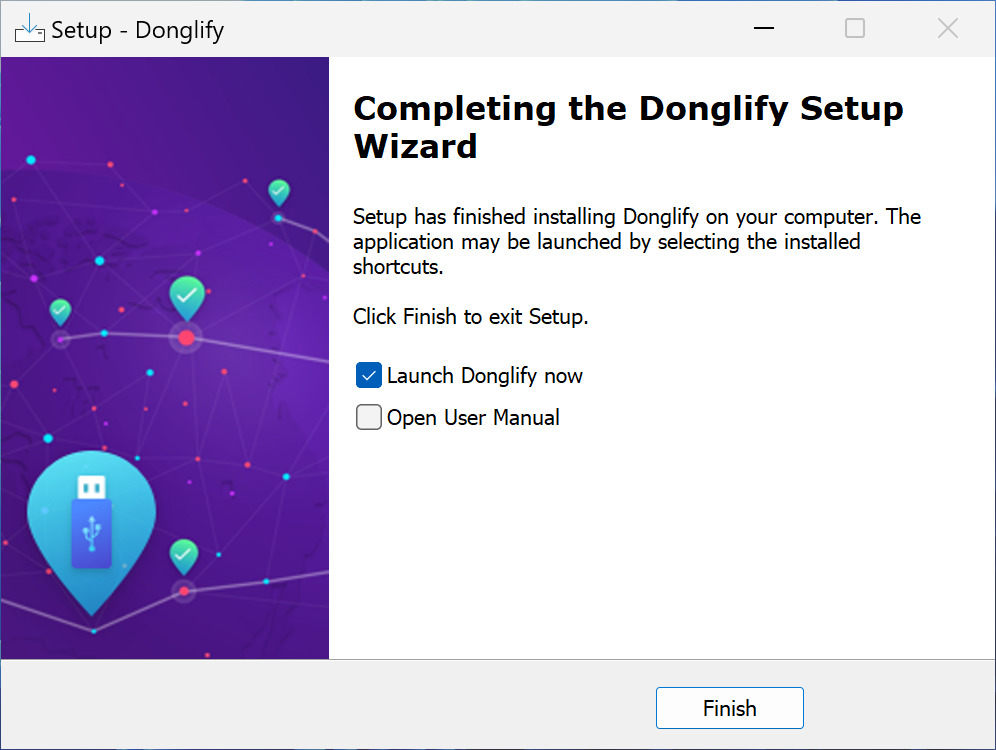
Download and install Donglify on both the local and the remote machine.
 Download and install Donglify
2
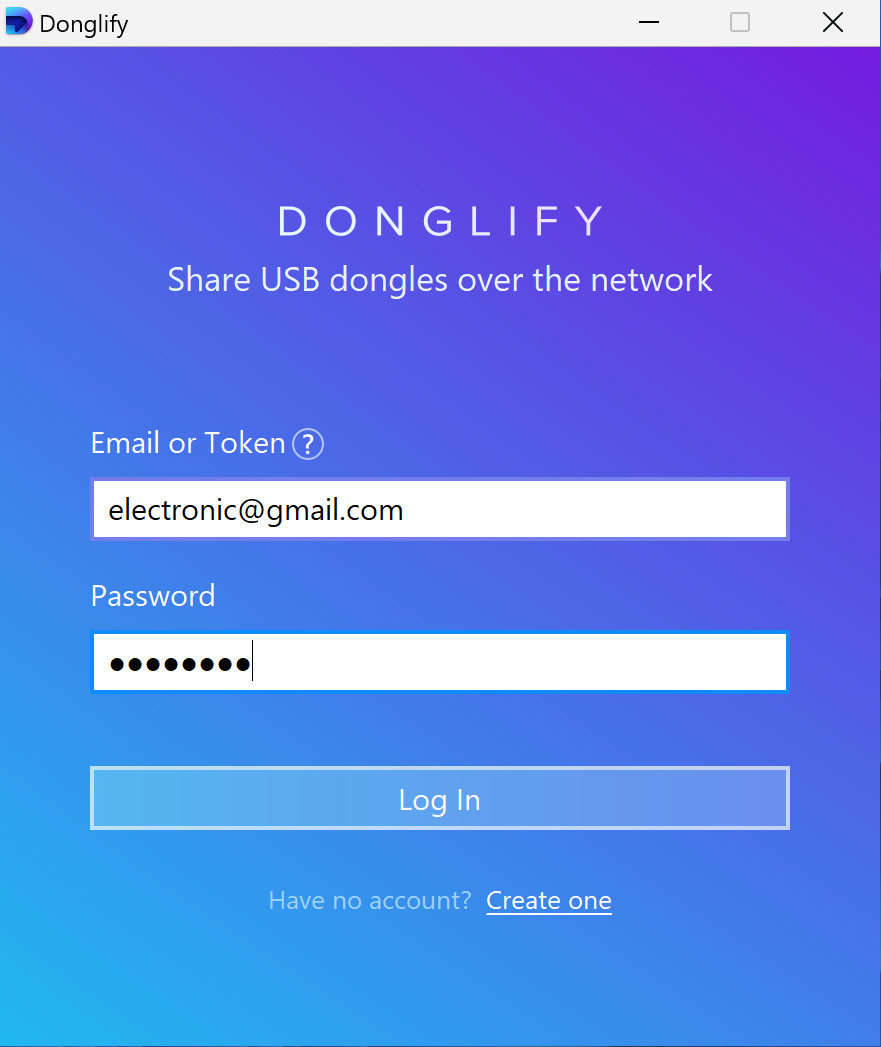
Sign in on both instances of Donglify.
 Sign in on Donglify
3
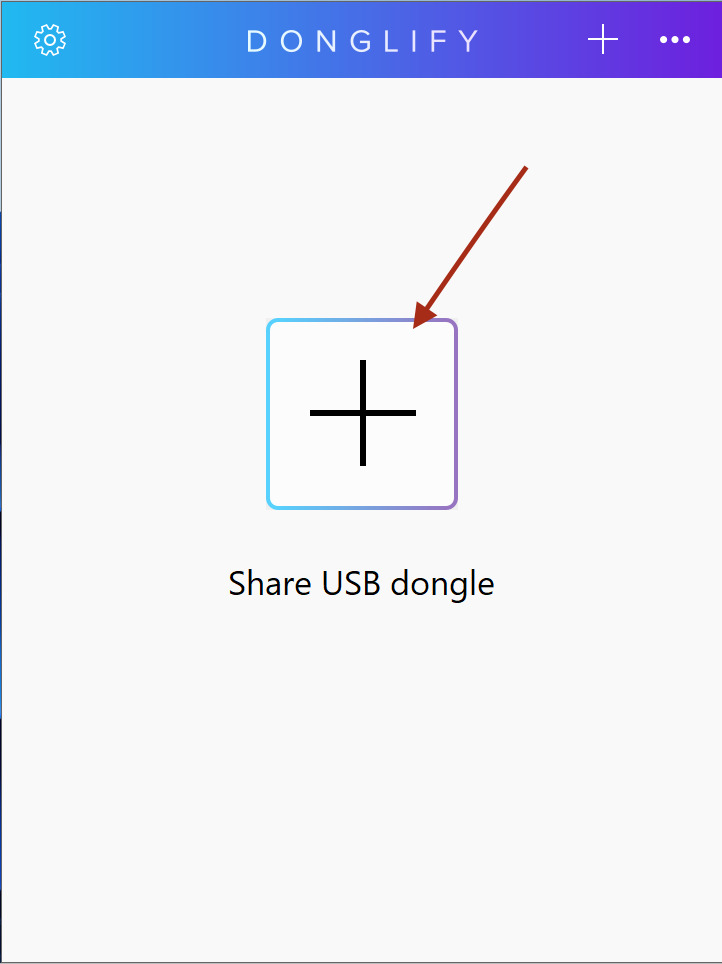
On the USB dongle host, click “+”.
 click the + button to share USB dongle
4
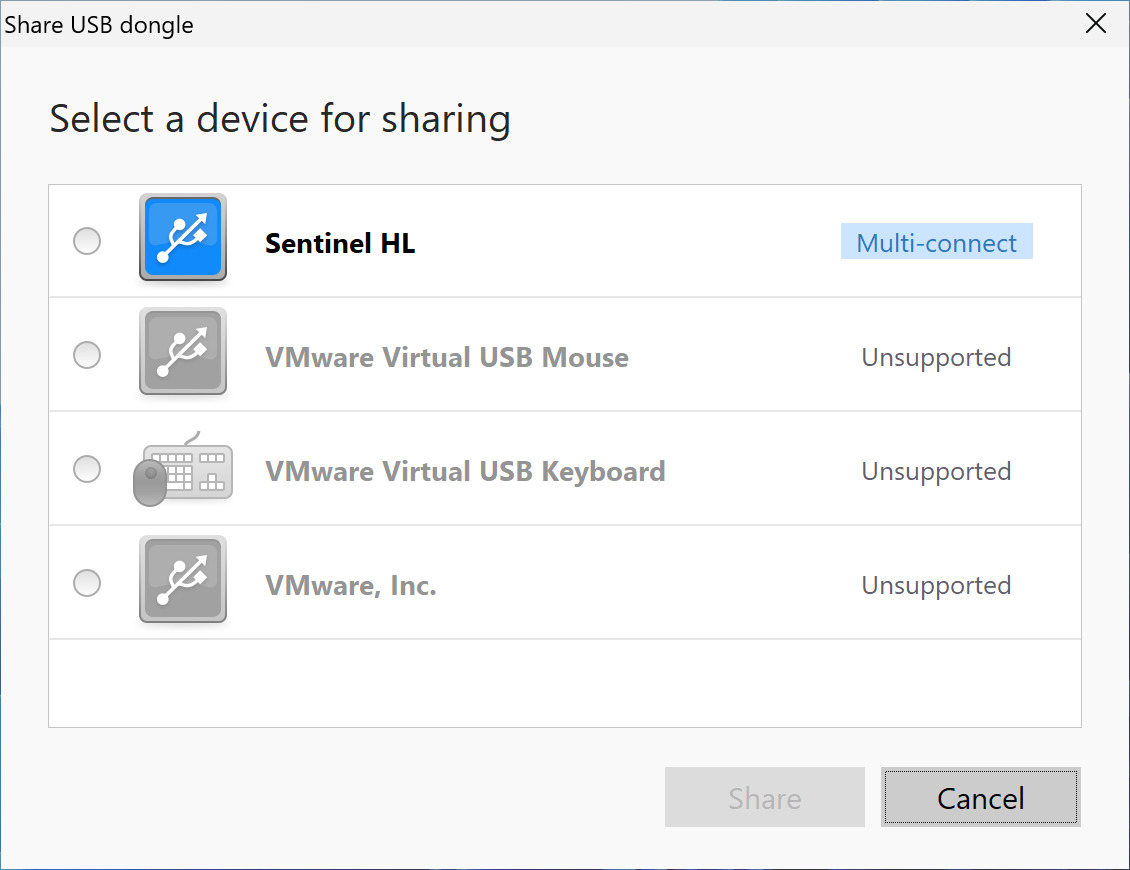
Select your device from the list and click “Share”.

If the dongle key can be shared by more than one client simultaneously, you will see the multi-connect icon next to its name.
 Select the dongle from the device
5
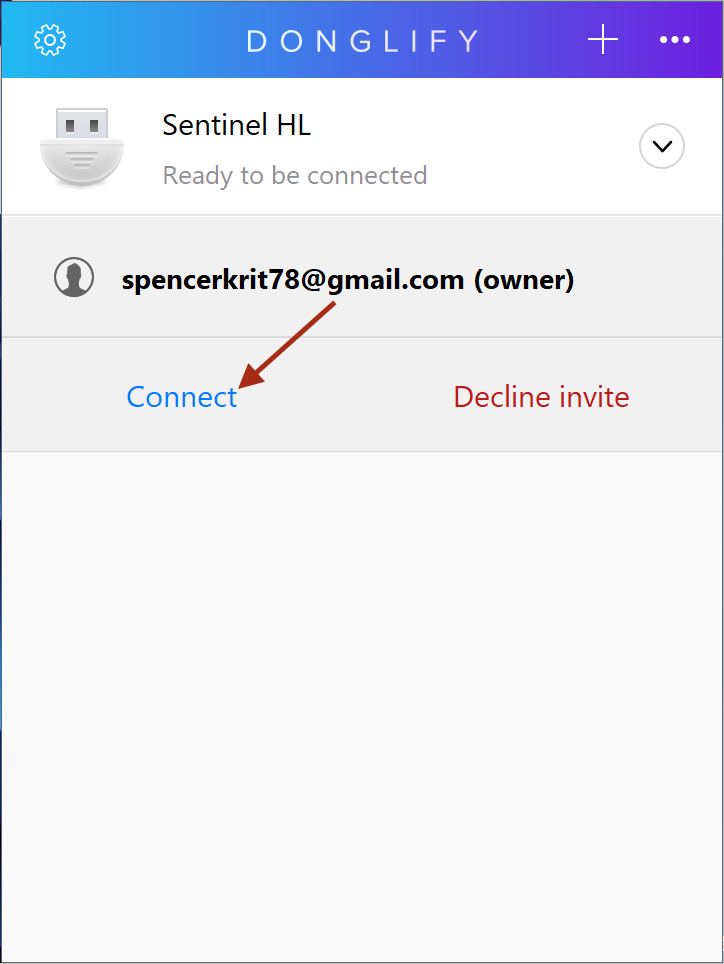
On the remote computer, simply select the device from the list and click “Connect”.
 click “Connect” on remote PC

Watch the following video for a demonstration:

Share USB device

Who Actually Needs Donglify

Donglify fits anywhere a physical dongle creates friction between the license and the person who needs to use it.

Teams sharing a single key. One dongle, multiple people who need it. Put it on a host machine, share it over the network, remove the physical handoff entirely.

Businesses with more than one location. Moving a dongle between offices is slow and easy to get wrong. One fixed location for the key, remote access from everywhere else.

Remote and hybrid workers. Software licensed. Dongle in the office. Work stops until the hardware is physically available. Remote access removes that dependency.

Virtual machines and remote desktop environments. Dongle-protected software regularly fails inside VMs and over RDP. Network-based sharing is the most reliable workaround I've found.

Environments where the dongle is constantly handled. A key plugged and unplugged every day has a shorter life than anyone budgets for. One fixed connection, never touched again, reduces that risk considerably.

Share security dongle with Donglify!
Start your 7-day free trial!

Donglify vs. the Alternatives to Use Software Without Dongle

Before committing, it's worth knowing what else exists for teams trying to use software without dongle access present at every machine.

Older built-in Windows USB redirection options:

Configuration-specific, often unreliable with dongles needing specialized drivers, and not a clean fit for standard RDP workflows. Works in narrow scenarios only.

Hardware dongle servers (Digi AnywhereUSB, SEH Dongleserver Pro):

Physical appliances with network-accessible USB ports. Solid in fixed enterprise setups with dedicated IT support, but hardware costs, maintenance, and rack space make them impractical for smaller teams.

USB Network Gate:

USB Network Gate is a general USB-over-network tool covering LAN, internet, RDP, and VM environments. Not dongle-specific, which makes it flexible for broader USB passthrough needs. If you need more than dongle sharing, it's worth looking at. If the specific problem is dongle access, Donglify is the more direct tool.

The Bottom Line

Dongle-based software licensing assumes the user and the hardware key are always in the same place. That assumption hasn't held up.

Donglify doesn't remove the physical dongle from the picture. It shares access to it over the network. The dongle is still the licensing device. You still need to check your software vendor's license terms before rolling this out, and you still need to test your specific configuration.

So if you need to use software without dongle access in the same room, or you're looking for how to use software without dongle handoffs between people and locations, this is the practical route I've found. It won't eliminate the key, but it does let teams run software without dongle shipping, desk-to-desk transfers, or unnecessary downtime.

For teams losing hours to a piece of USB hardware they can't reach, a 7-day trial costs nothing to run.

Already a Donglify user? Sign In →